
How to Sell Tickets Through Ambassadors: 2026 Guide
How to Sell Tickets Through Ambassadors: 2026 Guide
Overview
Paid ads keep getting more expensive, and a single organiser can only reach so many buyers directly. The people who already love your event, from local promoters and community leaders to student reps and partner businesses, can reach the audiences you can’t if you give them a structured way to sell.
This is where you sell tickets through ambassadors: you turn trusted people into a distributed sales team, each with their own ticket allocation, commission, and private login. This guide covers what selling through ambassadors involves, how it differs from an affiliate link, and how to set it up on Ticmint so you can reach buyers who already trust the seller.
Ticmint runs this as a native feature inside the same dashboard organisers use to build events. The platform already powers 1,600+ events, 820K+ fans, and millions+ in transactions across 138 countries (Ticmint, 2026), so ambassador sales flow through the same reporting and access-control stack as every other channel.
What Does It Mean to Sell Tickets Through Ambassadors?
To sell tickets through ambassadors means recruiting vetted people to sell on your behalf while you keep full control over pricing, inventory, and branding. Each ambassador gets a defined ticket allocation, a commission, and a private login, and every sale is tracked back to them. The organiser sets the rules; ambassadors bring the reach.
This is different from generic influencer marketing. Instead of hoping a post drives clicks, you hand each ambassador a set quantity of tickets, a commission structure, and a portal to sell from. Then you can see exactly what each one sold.
Why Selling Through Ambassadors Beats Buying More Ads
Peer recommendations convert where cold ad impressions don’t. As a result, selling through ambassadors tends to lower customer acquisition cost while extending reach into audiences an organiser has no other line into. Here is what the model gives an organiser:
- Lower acquisition cost: you pay commission only when a ticket actually sells, not per impression. This means marketing spend tracks revenue instead of running ahead of it.
- Reach into new segments: a campus rep, a regional promoter, or a partner venue each opens an audience you would otherwise pay a platform to reach.
- Control stays with you: ambassadors sell within the pricing, inventory, and branding you set. They never own the checkout or the buyer data.
- Attribution on every sale: because each ambassador has their own allocation and login, tickets sold and commission are tracked per person, not guessed at from a discount code.
How Ticmint's Ticket Ambassador Feature Works
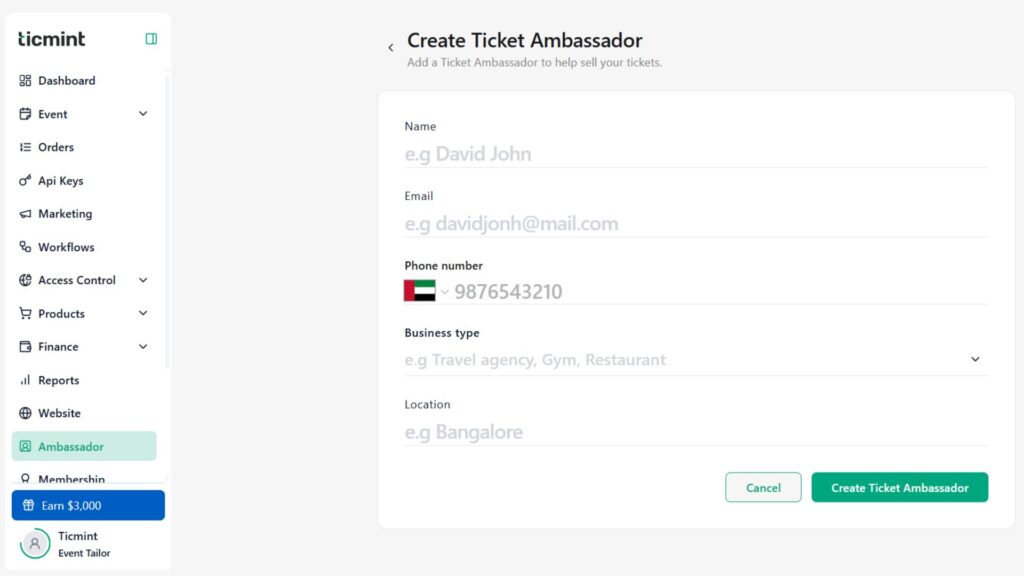
Ticmint’s Ticket Ambassador feature lives here in the product. It also runs on the same event, currency, and access-control settings as your main box office, so nothing needs to be reconciled across systems. There are two ways an admin creates one: from the dedicated Ambassador module, or directly from an event’s page under Ticket Ambassador → Create Ticket Ambassador.
Each ambassador record captures a small set of fields, which keeps onboarding fast while still supporting business-grade partners:
Field | Requirement | Why it matters |
|---|---|---|
Name | Mandatory | Attribution and payout reference |
Mandatory | Login identity and invitation (one email = one ambassador account) | |
Phone number | Optional | Direct contact during a live sale window |
Business type | Mandatory | Distinguishes a solo promoter from a reseller or partner business |
Location | Mandatory | Territory and compliance context across markets |
One rule to design around: the same email address cannot create more than one ambassador account. Consequently, if you work with partners who run multiple entities, map each to a distinct email before you start.
For a full click-by-click walkthrough, see the Ticket Ambassador setup guide in the Ticmint support portal.
Setting Commission: Percentage, Flat, or Mixed
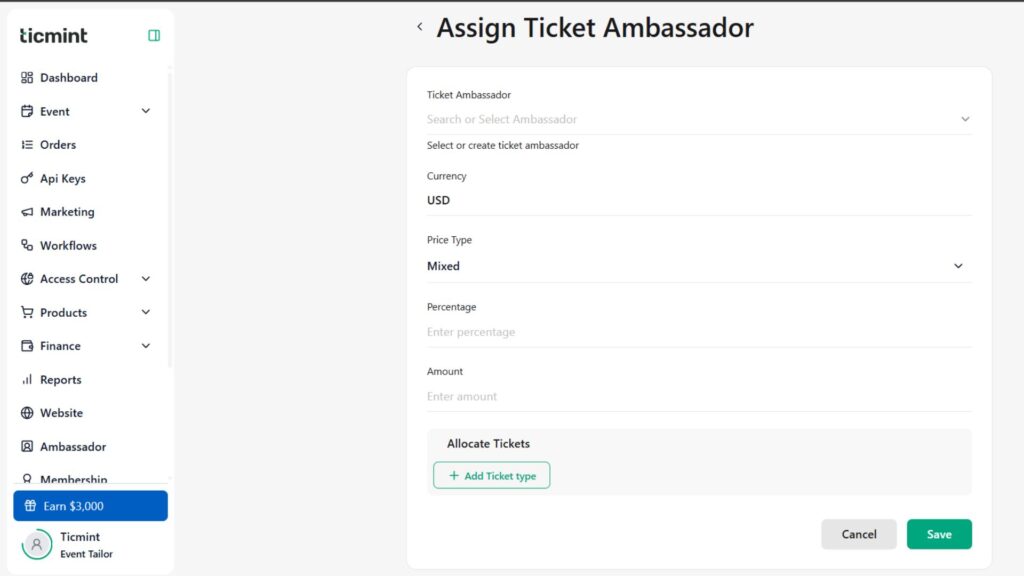
When you assign an ambassador to an event, review the event currency (set it in event settings first, since you can’t change it from the assignment screen), then choose how they earn. Ticmint supports three commission types:
- Percentage: a share of each ticket’s value.
- Flat: a fixed amount per ticket, regardless of price.
- Mixed: a flat amount plus a percentage, useful when you want a floor per sale and upside on premium tiers.
You can also override the default commission for a specific ticket type, so an ambassador might earn a flat fee on general admission but a higher percentage on VIP. This means you can steer effort toward the inventory you most need to move.
Allocating Tickets and Selling Slots
An ambassador only sells what you give them. During assignment, you select a ticket type, enter a quantity, and then decide which selling slots they can draw from:
- All slots: the ambassador can sell across every date.
- All slots from selected dates: scoped to a date range.
- Specific slots: pinned to exact sessions, ideal for multi-day festivals or recurring events.
You can add more ticket types to the same ambassador and then save the assignment. As a result, a single ambassador can carry a tailored basket, say 200 GA for the weekend plus 20 VIP for Saturday only, without ever touching your remaining public inventory.
The Ambassador Portal and Box Office
Once assigned, the ambassador receives an email invitation and logs in with their registered email and a verification code. Two details to plan around: they should review commission before accepting, and the invitation link expires after 15 days, so send it close to when you want them live. Invitations sit in one of three states: Pending, Accepted, or Rejected.
The portal is private to each ambassador: a login-gated workspace, not a public page. There is no shareable ambassador storefront for buyers to browse; each ambassador sees only their own allocation, orders, and performance, scoped to their own activity. This means ambassadors sell directly rather than by handing out a public link.
What sets this apart from a simple referral link is the box office inside that portal. Instead of sharing a URL, ambassadors issue tickets themselves:
- Select ticket quantity, enter the buyer’s name and email (phone optional), review the order summary, and submit.
- Generated tickets can be printed as paper tickets (if configured) or downloaded, which suits cash-in-hand and on-ground sales.
One operational note for support teams: if an ambassador hits “Paper ticket is not configured for this order,” the fix is on the admin side, where you enable paper ticket configuration for that event. Full portal steps live in the Ambassador Portal guide.
Monitoring Ambassador Performance
Tracking runs on two levels. From the Ticket Ambassador dashboard, the admin sees the aggregate view across every ambassador: tickets allocated, tickets sold, commission details, ambassador status, and event assignment information. Each ambassador, by contrast, only sees their own numbers inside their portal, never other ambassadors’ sales or the wider event totals. As a result, you can spot an ambassador with zero traction early and reallocate their unsold inventory before the event, rather than discovering it in a post-event report.
Ticket Ambassadors vs Affiliate Links
Both channels reward people for driving sales, but they solve different problems. Ambassadors are a managed, allocation-based sales force with box office access; affiliates are a lighter, link-based referral layer. Many organisers use both.
Ticket Ambassador | Affiliate Link | |
|---|---|---|
Inventory | Dedicated allocation per person | Shared public inventory |
Selling method | Private portal + box office issuance | Public trackable referral link |
Best for | Promoters, resellers, on-ground sales | Fans, media, passive referrers |
Control | High: slots, ticket types, commission overrides | Moderate: commission on referred sales |
If a referral-link model fits a particular
Ticket Ambassador at a Glance
Area | What you get |
|---|---|
Setup | Create from the Ambassador module or any event page |
Commission | Percentage, Flat, or Mixed, with per-ticket-type overrides |
Inventory | Allocate specific quantities and selling slots per ambassador |
Selling | Private ambassador portal with full box office issuance |
Fulfilment | Paper tickets, downloads, QR codes, invoices, resend |
Reporting | Allocated vs sold, commission, and status per ambassador |
Invitation | Email invite, verification-code login, 15-day link expiry |
Available Across Your Markets
Because the Ticket Ambassador feature is part of the core Ticmint dashboard rather than a regional add-on, it works the same way whether your event runs in the US, UK, India, or the UAE. Each event carries its own currency, so an ambassador in one market sells in that market’s currency while you manage everything from one place. That matters for organisers scaling a DIY ticketing model across borders.
Frequently Asked Questions (FAQs)
1. What does it mean to sell tickets through ambassadors?
To sell tickets through ambassadors means recruiting vetted people to sell on your behalf while you keep control of pricing, inventory, and branding. Each ambassador gets a ticket allocation, a commission structure, and a private login, and every sale is attributed to them for tracking and payout.
2. How do ticket ambassadors get paid?
Organisers set a commission that can be a percentage of the ticket price, a flat amount per ticket, or a mix of both, and can override the rate for specific ticket types. Ticmint tracks tickets sold and commission per ambassador on the dashboard; the organiser then settles payout under the terms they agreed with each ambassador.
3. Can ambassadors sell tickets or only promote them?
On Ticmint, ambassadors actively sell. Through the ambassador portal’s box office, they issue tickets directly, selecting quantity, entering buyer details, and generating printable or downloadable tickets with QR codes. This makes the feature suited to on-ground, cash-in-hand, and reseller-style selling, not just online link sharing.
4. How is selling through ambassadors different from affiliate links?
Selling through ambassadors gives each seller a dedicated ticket allocation and a private box office to issue from, so it suits promoters and resellers who handle sales directly. An affiliate link is different: affiliates earn commission on sales referred through a trackable URL drawn from shared public inventory. Many organisers use both channels together.
5. How do I set up ticket ambassadors for my event?
In the Ticmint dashboard, create a Ticket Ambassador from the Ambassador module or an event page, enter their details, then assign them to the event. During assignment, you choose a commission type, allocate ticket types and selling slots, and save. The ambassador receives an email invitation and logs in to start selling.
6. Can ambassadors issue physical or box office tickets?
Yes. The ambassador portal includes a box office where ambassadors issue tickets on the spot, then print paper tickets or download them with QR codes. If an ambassador sees a “paper ticket is not configured” message, the event admin needs to enable paper ticket configuration for that event before printing will work.
7. Is the Ticket Ambassador feature available in the US, UK, India, and the UAE?
Yes. The Ticket Ambassador feature is built into the core Ticmint platform rather than being region-specific, so it operates the same across the US, UK, India, and the UAE. Each event uses its own currency, letting organisers sell through ambassadors in multiple markets from a single dashboard.
Start Selling Through Ambassadors
Turning your most connected supporters into a tracked sales team is one of the lowest-cost ways to grow ticket sales. You can set up the Ticket Ambassador feature on Ticmint alongside every other channel in the same event dashboard: set commission, allocate inventory, and watch each sale land in real time.
Want to see how Ticmint works for your event?
Talk to our enterprise team. Most clients are live within 2–4 weeks.
Running events?
Build experiences people remember, and own every part of it.
- Your brand, your experience- fully white-labeled
- Save up to 35% on platform fees
- Own your data-audience, revenue & insights, all yours
This will redirect you to WhatsApp chat 🙂
Subscribe to our newsletter
Get fresh ideas, expert insights, and actionable strategies for memorable events, delivered straight to your inbox!