
New on Ticmint: AI-Designed Themes and Tickets That Actually Land
New on Ticmint: AI-Designed Themes and Tickets That Actually Land
Overview
Most of what we build comes down to trust between two people: the organizer selling a ticket, and the person buying it. The organizer needs the event page to feel like theirs. The buyer needs their ticket to show up, work at the gate, and not get lost in a spam folder.
This batch of updates is about both sides of that relationship. We shipped an AI chat that builds your event theme for you, a rebuilt ticket delivery system for large orders, full-funnel tracking so you finally know where your buyers came from, and a handful of updates that make running multi-currency, multi-org, multi-team events feel a lot less like juggling.
Every single one of these is live right now, and we’re genuinely excited about a few of them.
Why We Built These Updates
A lot of our organizers run more than one event, in more than one currency, with more than one person on the team. Their attendees, meanwhile, just want a ticket that arrives fast and works when they scan it. We kept hearing the same two things: theming an event page still took too long without a designer, and large orders were occasionally getting stuck somewhere between “purchased” and “in your inbox.” So this release tackles both, along with a stack of smaller fixes that add up.
What's New
Design Your Event Page With AI, Not a Developer
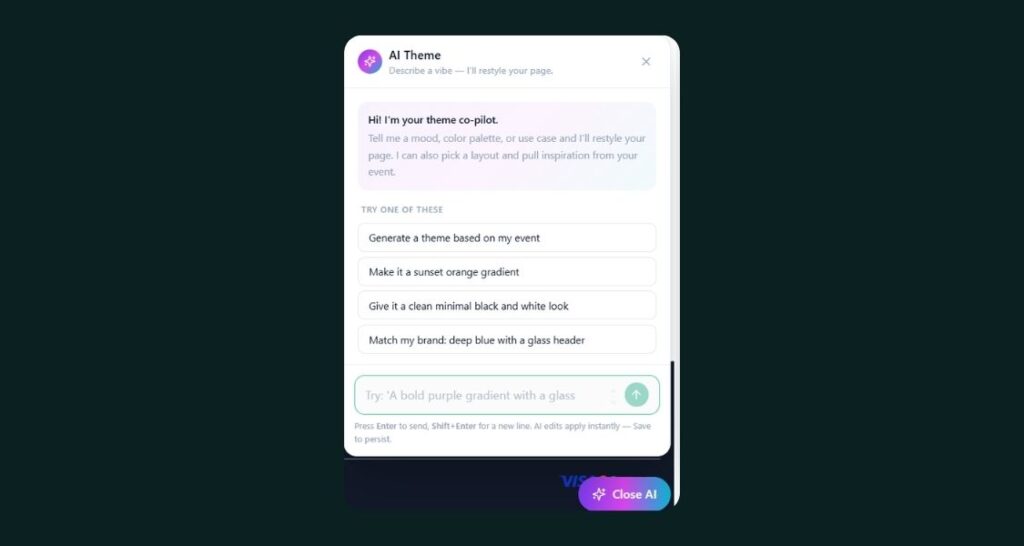
This is the one we’re most excited about. Theme AI Chat lets you describe the look you want and have Ticmint build it for you, no code, no waiting on a designer. It sits alongside a full visual refresh across every layout, including glass effects on headers and sticky bars, background image support, and live theme previews across web, mobile, and tablet before you publish anything. Which means the gap between “I have an idea for how this event should look” and “it’s live” just got a lot shorter.
Tickets That Actually Land in Inboxes
Large orders now route through an alternative email service built specifically to handle volume, so a 200-ticket group order doesn’t stall somewhere in delivery. Every buyer gets two things: an Order Invoice Email and a Ticket Email with individual download links, a Download All option, QR codes, ticket IDs, and a calendar file so the event lands straight on their phone. We also added WhatsApp Ticket Delivery, so buyers who’d rather get their ticket that way can, with a direct download link included. This means fewer “I never got my ticket” messages for you, and one less thing your attendees have to think about.
See Exactly Where Your Buyers Come From
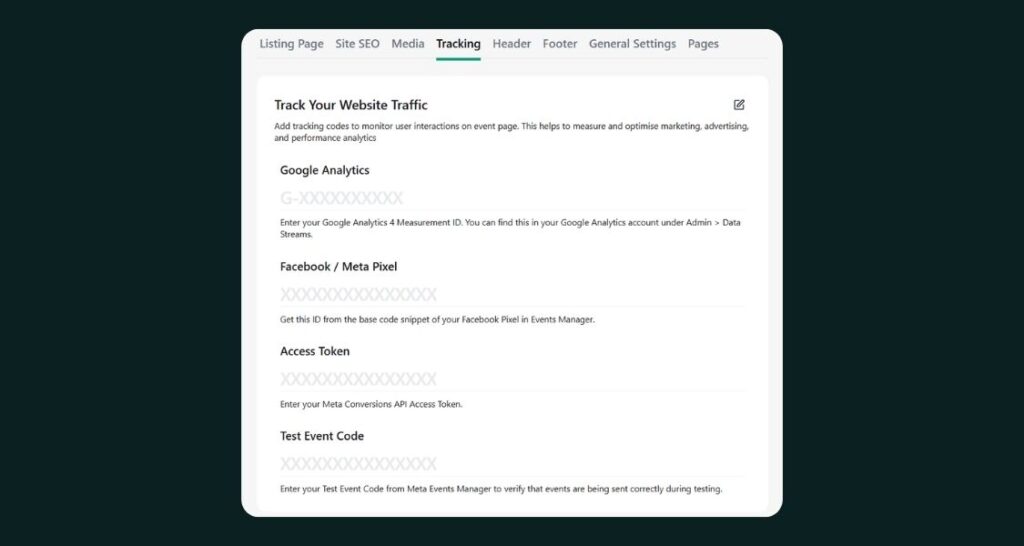
Meta Event Manager is now fully wired into Ticmint. Add your Pixel ID, Access Code, and Test Event Code once, and we track page views, ticket and add-on selection, form views and submissions, checkout starts, and completed orders automatically. On top of that, UTM Tracking now works for your published event URLs, so you can build a link for your Instagram Story or a specific campaign and actually see what it brought in. Which means the next time someone asks “what’s actually driving ticket sales,” you’ll have a real answer.
Built for the Box Office
If you run physical sales, this one’s for you. Stock Tickets can now be enabled across every channel or scoped to Box Office only, with QR based stock tickets generated on the spot. Paper ticket sequence numbers can be reset to a custom value even after cancellations, and a new HTML upload option gives you precise control over where the QR code sits on a printed ticket. Combined with our Validator app for on-the-ground scanning, your box office team now has a workflow that doesn’t depend on a laptop and a spreadsheet.
Built for Organizers Running Multiple Events, Currencies, and Teams
If you’re scaling past a single event in a single currency, this is the update you’ve been waiting for. Event creation now defaults to your Organizer Currency instead of guessing from the event’s location, and a new Multi Currency Toggle means you only get multi-currency pricing when you actually want it. For teams working across several organizations, a new Organisation Selection step lets you pick which organization you’re working in right after login, so your data always stays where it belongs.
More Payment Flexibility, More Places
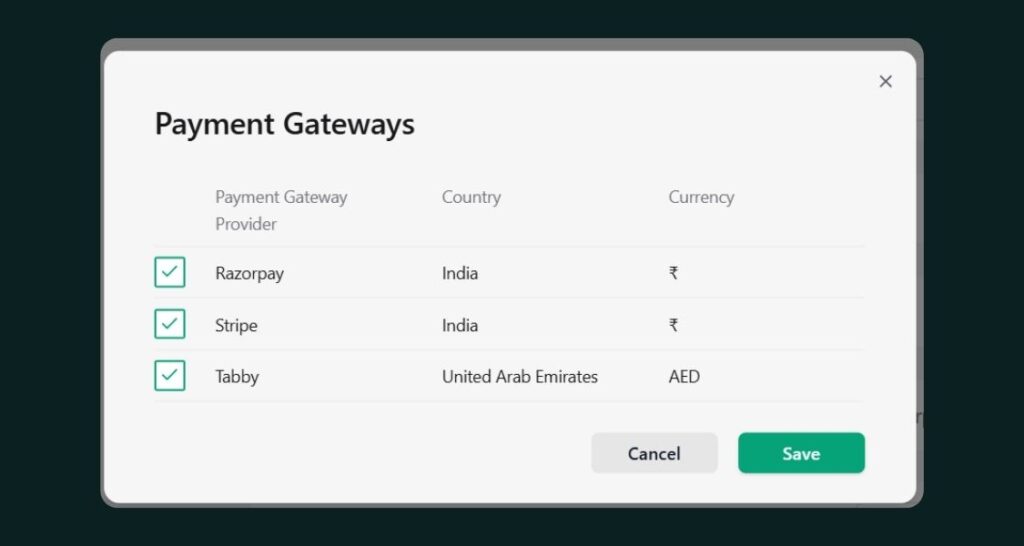
Every event can now run its own payment gateway with automatic fallback to your default, plus a configurable Payment Session Timeout so checkout sessions behave the way you expect. Service Fee can be configured separately for Box Office and Online sales, instead of forcing one number across both. And we added support for TikMoney as a payment gateway in Rwanda, because we’re building for organizers everywhere, not just the markets we started in.
Roles and Permissions That Match Your Team
Validators can now be created without an email address, with credentials generated automatically and downloadable as a CSV at the global or event level, which makes onboarding gate staff for a one-off event dramatically faster. We also added a new Staff User role with clean read-only access, so someone can see everything without the ability to accidentally change it. And you can now restrict ticket edits entirely once tickets are sold, protecting event details once buyers are already holding a ticket for them.
A Few More Small Upgrades
A handful of smaller updates round things out:
- Recipient lists now support mobile number or email, with Name now required on manual entries and CSV imports
- Buy-flow forms accept file uploads, so you can collect IDs, waivers, or documents right at checkout
- Ticket prices can be hidden on both your Listing and Explore pages, not just Explore
- Listing pages now load with infinite scroll, pulling in 40 events at a time
- Email and mobile numbers can be masked directly on e-tickets for privacy
- UK events get proper DST-aware timezone handling, switching between GMT and BST automatically
- Ticket Ambassador invitations are now partner-specific and valid for 15 days
- Large multi-category events can assign a different ticket template per category
- Explore sign-in now offers a “Continue with Email” option
- Google Event integration support was added for organizers who use it
- Notification emails can now show a custom Sender Name instead of the default
Product Update at a Glance
Area | What Changed |
Event Theming | Theme AI Chat, new UI across all layouts, glass effects, background images, live multi-device preview |
Ticket Delivery | Dedicated delivery service for large orders, Order Invoice + Ticket Email with QR and calendar file, WhatsApp ticket delivery |
Tracking | Full Meta Event Manager funnel tracking, UTM tracking for published event URLs |
Box Office | Stock Tickets (all channels or Box Office only), QR-based stock tickets, resettable paper ticket sequence numbers, paper ticket HTML upload |
Multi-Org & Currency | Organizer Currency as default, Multi Currency Toggle, Organisation Selection at login for multi-org users |
Payments | Event-wise Payment Gateway with fallback, Payment Session Timeout, separate Box Office service fee, TikMoney gateway (Rwanda) |
Roles & Access | Validator creation without email, CSV credential export, new Staff User read-only role, lock on ticket edits after sale |
Small Upgrades | Recipient list improvements, buy-flow file uploads, hidden pricing, infinite scroll listings, e-ticket masking, DST-aware timezones, partner-specific Ticket Ambassador invites, category-wise templates, Google Event integration, custom sender name |
Frequently Asked Questions (FAQs)
1. Can I design my event theme without hiring a designer?
Yes. Theme AI Chat lets you describe the look you want and builds the theme for you directly inside Ticmint, with a live preview across web, mobile, and tablet before you publish.
2. How does Ticmint track my Meta and campaign conversions?
Once you add your Meta Pixel ID and Access Code, Ticmint automatically tracks page views, ticket selection, form submissions, checkout starts, and completed orders through Meta Event Manager. UTM Tracking adds the same visibility for individual campaign links.
3. How do attendees receive their tickets?
Buyers get an Order Invoice Email and a separate Ticket Email with QR codes, individual download links, a Download All option, and a calendar file. Large orders route through a dedicated delivery service, and tickets can also be delivered directly through WhatsApp.
4. Can I run stock tickets and Box Office sales alongside online tickets?
Yes. Stock Tickets can be enabled for all sales channels or restricted to Box Office only, and QR-based stock tickets can be generated on the spot for in-person sales.
5. Does Ticmint support multiple currencies for one organization?
Yes. Event creation now defaults to your Organizer Currency, and a Multi Currency Toggle lets you enable or disable multi-currency pricing per event as needed.
6. Can I use a different payment gateway for different events?
Yes. Payment gateways can now be configured per event, with automatic fallback to your default gateway if the event-specific one isn’t available.
7. Can I give a team member read-only access without full admin rights?
Yes. The new Staff User role gives read-only access to organizer features, so team members can view everything without being able to create, edit, or delete.
8. Can I hide ticket prices on my event listing page?
Yes. Hiding ticket prices now works on both the Listing page and the Explore page, where it was previously Explore-only.
Get Started
Every feature in this release is live in the Ticmint dashboard today. Start with Ticmint or visit support.ticmint.com for setup guides on theming, tracking, and payments.
Want to see how Ticmint works for your event?
Talk to our enterprise team. Most clients are live within 2–4 weeks.
Running events?
Build experiences people remember, and own every part of it.
- Your brand, your experience- fully white-labeled
- Save up to 35% on platform fees
- Own your data-audience, revenue & insights, all yours
This will redirect you to WhatsApp chat 🙂
Subscribe to our newsletter
Get fresh ideas, expert insights, and actionable strategies for memorable events, delivered straight to your inbox!