
Ticmint’s Powerful New Update: Stripe Connect, Discounts & More
Ticmint Update: Stripe Connect, Service Fees & Whitelabeling
Overview
This is a big one. Organisers asked for more control over pricing, and more ways to reward bulk buyers. They also asked for more ownership over how their dashboard looks to their own customers. This update delivers on all three.
Group Discounts and Bulk Discounts give organisers new ways to drive larger orders. Additionally, a new Service Fee model changes how platform fees are calculated and gives finance teams cleaner invoices.
Dashboard Whitelabeling lets partners put their own logo, banner, and policy links on their dashboard. Meanwhile, Stripe Connect brings global payouts to USA and UK accounts, and billing plans now flex by region and by period. Underneath all of that, dozens of smaller upgrades cleaned up checkout, workflows, and the admin panel.
Here’s everything that shipped, organised by what it actually changes for you.
Group Discounts & Bulk Discounts: New Tools for Bigger Orders
Group Discount
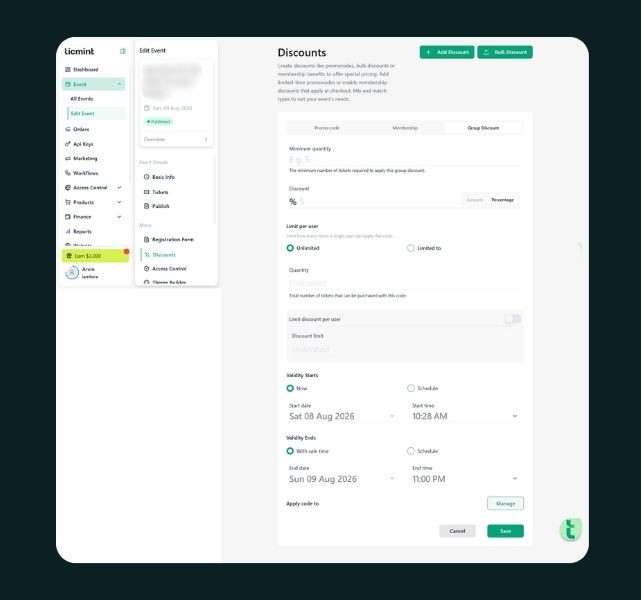
Organisers can now set a minimum ticket quantity, five tickets, for example, and attach a discount percentage to it. As a result, when a buyer selects enough tickets to qualify, they see a live message: “You will get X% discount on 5 tickets.” In fact, it works across seated events, non-seated events, and DTCM events. In practice, it nudges undecided buyers toward buying one or two more tickets to hit the discount threshold. That small push tends to lift average order value along the way.
Bulk Discount
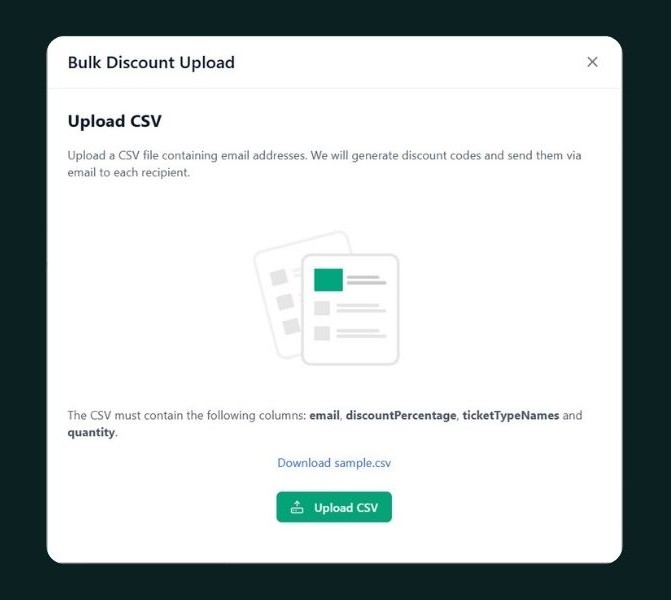
Bulk Discount solves a different problem: allocating tickets to a list of people at once, instead of one order at a time. Organisers upload a CSV with each buyer’s email, ticket type, and quantity. From there, Ticmint processes the file, applies the discount, and emails every buyer their allocation automatically. This is built for corporate bookings and large group sales. The organiser already has the guest list; they just need to get tickets into everyone’s inbox.
Service Fee: A New Way to Price Tickets
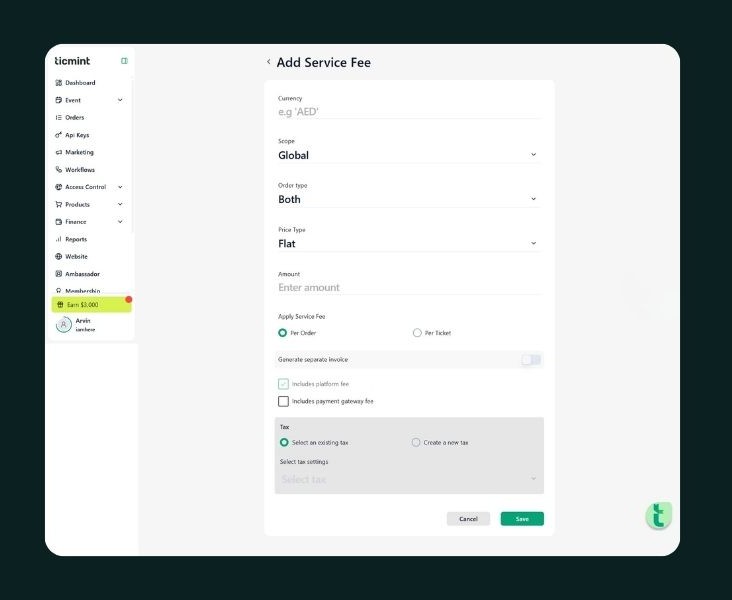
Platform fees used to apply only to the ticket price. Now, they’re calculated on ticket price plus applicable taxes, a small but important change for anyone doing the math on take-home revenue.
In addition, we introduced a standalone Service Fee. It’s also calculated on ticket price plus tax, and it supports multiple tax components at once, such as CGST and SGST. When Service Fee is enabled for an event, the platform fee is absorbed into it instead of being charged separately. As a result, the customer sees one fee, not two.
Service Fee is setting-driven, meaning it only appears if it’s included in a partner’s subscription plan. Additionally, it can be configured at three levels:
- Global level
- Organizer level
- Event level
Organisers who need separate accounting for service fee revenue can turn on a separate invoice toggle. With a SAC code added, Ticmint generates a distinct service fee invoice alongside the general one. The general invoice, in turn, shows total amount and total service fee as separate line items.
Invoice Enhancements for Cleaner Finance
Conditional Invoice Attributes
Multi-state organisers can now configure GST details per state code on the Organization page, State Code 06, State Code 07, and so on. Then, at the event level, the organiser picks which state code applies. As a result, the invoice pulls the matching GST details automatically, so tax representation stays accurate without manual edits per event.
Service Fee Invoice Download
Organisers can now download the Service Fee invoice directly from Order → View Details, right alongside the standard invoice.
Dashboard Whitelabeling for Partners
Partners can now request full branding control over their dashboard. First, a partner requests it. Once Admin turns on Dashboard Whitelabel for their account, they can configure:
- A custom logo shown across the dashboard
- A banner image on the dashboard sign-in page
- A custom favicon
- Their own Terms & Conditions link on the sign-in page
- Their own Privacy Policy link on the sign-in page
This means a partner’s team can log in to what looks and feels like their own product, not a shared Ticmint interface.
Stripe Connect, Payouts & Flexible Plans
Stripe Connect & Payouts via Gateway
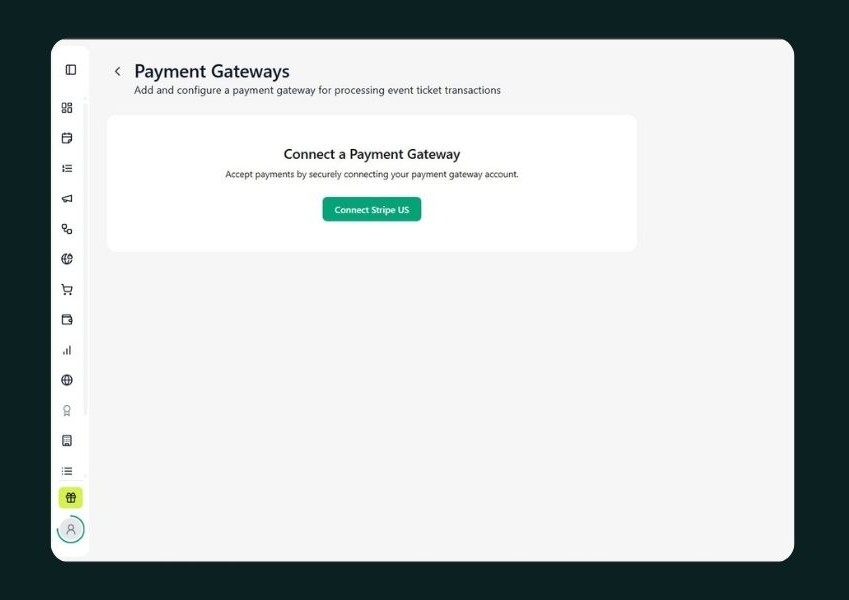
Stripe Connect and Stripe Subscription are now supported for USA and UK Stripe accounts. A new Payouts via Payment Gateway option is also available in Plan & Pricing. It activates when Custom Payment Gateway is off, other payout features are off, and the partner’s country is the USA or UK. Once enabled, a Stripe Connect button appears on the Payment page. From there, clicking it sends the administrator to Stripe to finish setup and create a payout account.
Flexible Billing & Region-Based Plans
Plans now come with descriptions on the pricing page, and organisers can choose Monthly, Quarterly, Half-Yearly, or Yearly billing. The Upgrade Plan page in the dashboard shows the plan description too, and the Free plan now displays its billing simply as “Free.”
Because Ticmint now onboards organisations from multiple countries, plans are assigned by region, India, UAE, USA, or UK – automatically. Additionally, feature toggles like RSVP, Seated, and Required Approval are disabled if they’re not included in the organiser’s plan. This way, there’s no confusion about what’s actually available. Google Sign-In is also now an option during onboarding. And partners coming from the website pricing page go straight to the plan upgrade page after signing up.
A Smoother Checkout & Order Experience
Reverse Order Summary
A new setting under Website → General Settings flips the order summary layout. When enabled, the total amount shows first, followed by the detailed breakdown: tickets, add-ons, taxes, and platform fee. As a result, buyers get the number they care about immediately, with the math available right underneath.
Ticket & Invoice Downloads
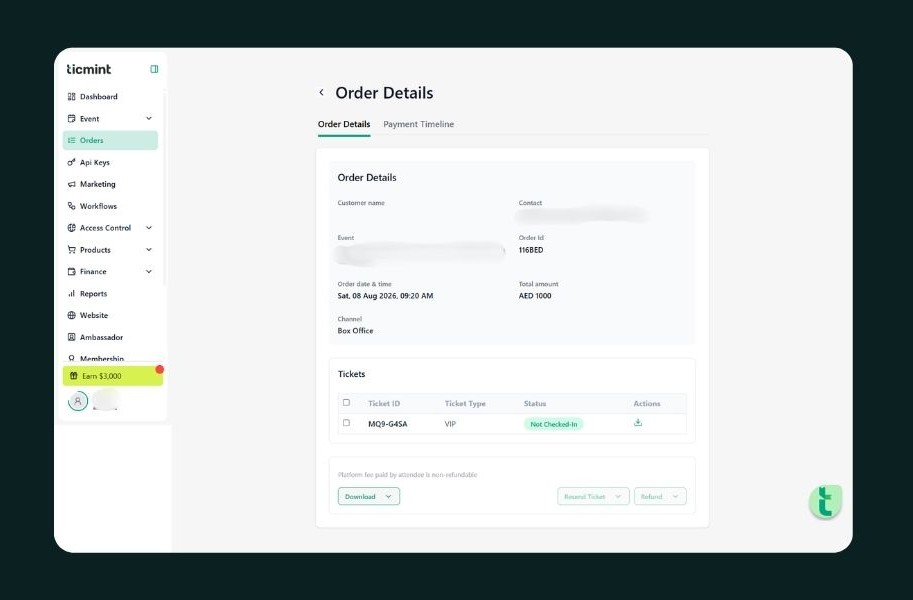
For example, organisers can now download an individual ticket from Order → View Details, for both standard and OTC orders. On larger orders, a single ZIP download includes every ticket in that order, QR codes included. In addition, invoices can now be downloaded directly from the order details page, without digging through email.
Ticket Template
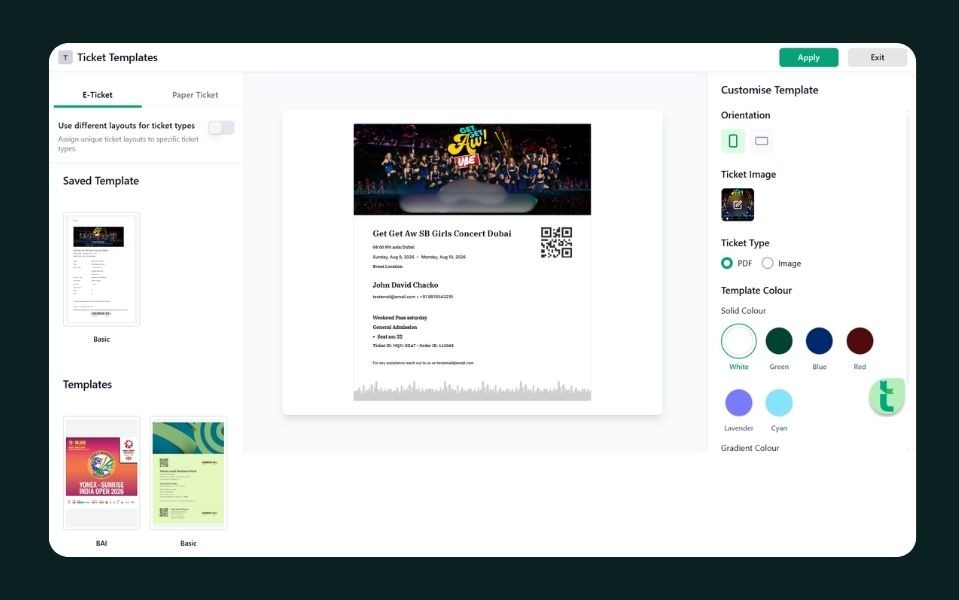
A dedicated Ticket Section has been added inside the Ticket Template. It gives organisers more structure and customization when designing how a ticket actually looks.
We also fixed a bug where the Checkout button stayed disabled on the Order Summary screen in the Explore app. This was blocking some customers from completing an order at all.
More Control Over Your Website & Policies
General Settings, Now on the Website Tab
Several settings that used to require an admin request are now self-serve, under Website → General Settings:
- Edit the Explore Page URL
- Edit the Builder URL
- Configure where the logo redirects on click (default listing page or a custom URL)
- Configure where “Explore More Events” redirects
- Set a post-success redirect, including a custom URL and a delay before it fires
Terms & Policy Handling
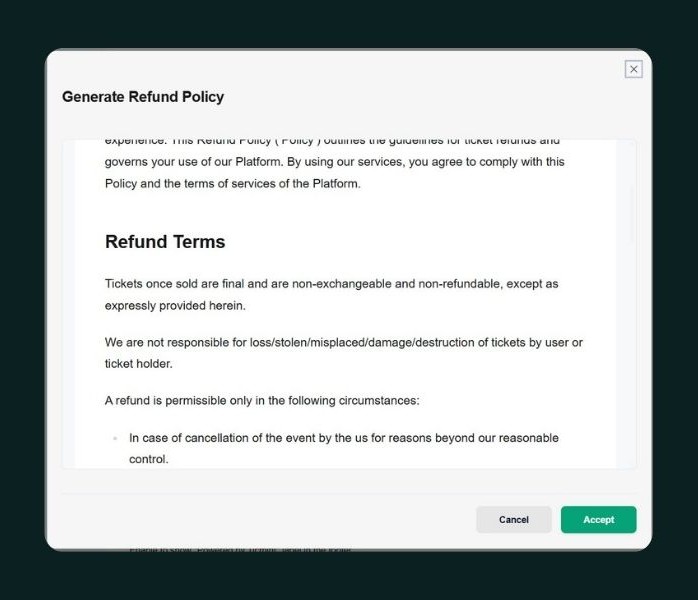
Policy documents – Terms, Privacy Policy, and others, now open in a full window instead of a small popup, which makes them easier to actually read. In addition, behind the scenes, the system now follows configuration:
- No policy URL and no content configured → redirects to Ticmint’s default policy pages
- An external URL configured → redirects to that link
- HTML content configured, no URL → renders on the partner’s own domain
- A CDN URL configured → renders the CDN-hosted content on the partner’s domain
Backend support for HTML policy content is live now; a UI for managing it directly is coming in a future release.
Tracking Tab Visibility
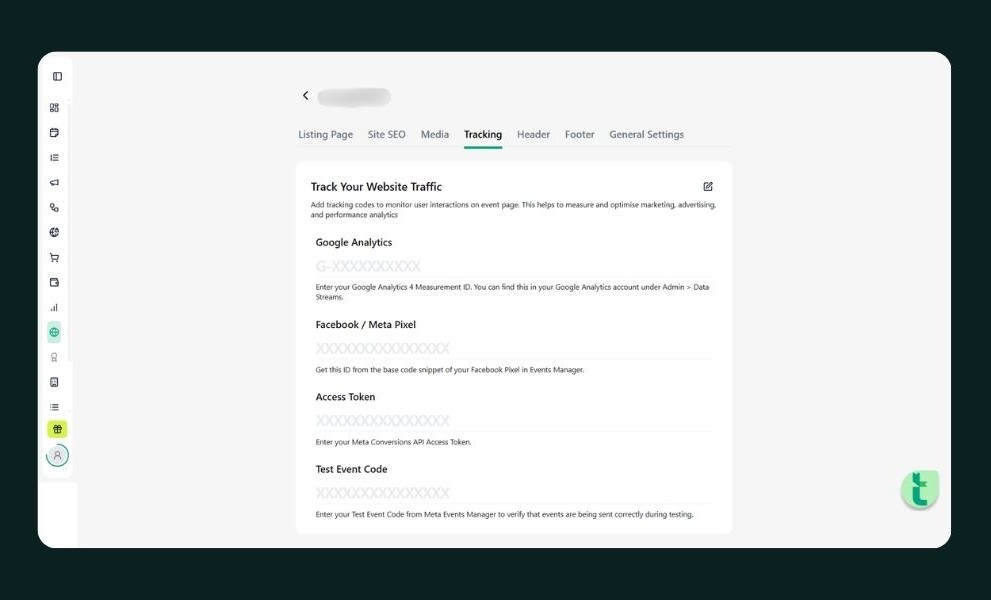
The Tracking tab on the website only appears when Page Visitor Analytics is turned on. If it’s off, along with related features, the tab stays hidden instead of showing empty options.
Also Fixed Before This Cycle
A few security and stability fixes shipped in the release just before this batch, worth calling out on their own.
Success pages and ticket downloads are now properly scoped. Users can no longer view another user’s success page, and ticket downloads are now restricted to the ticket owner, closing a gap where account data could be accessed across users.
A few more fixes landed alongside these:
| Area | What Changed |
|---|---|
| DTCM OTC | Fixed an issue where OTC orders with a mobile number created two separate users instead of one |
| Validator App | Added support to configure what shows on the Scan Completed screen (Ticket ID, Ticket Type, User Name, User Email) |
| Event SEO | Fixed incorrect SEO details on event links shared via WhatsApp |
Also Shipped This Round
A long list of smaller fixes and polish landed alongside the features above:
| Area | What Changed |
|---|---|
| Abandoned Cart | Duplicate emails for the same cart no longer sent |
| Partner Onboarding | Duplicate onboarding emails fixed |
| Dashboard Users | Users now scoped correctly to their own partner |
| Admin | New users can be assigned multiple roles at once |
| Recurring Events | Date picker button now reads “Select Date” instead of “Continue” |
| Workflows | Child event selection now works correctly |
| Event Clone | Cloning error fixed; Per Ticket forms now clone with the event |
| Organisation Creation | New orgs now correctly create an Event Manager login |
| Listing Page | Section filter now shows the correct events |
| Group Discount | Validation and display logic corrected |
| Description Editor | Fixed image visibility, Ctrl+A, extra-line, and list alignment issues |
| Loading States | Added to Order, Settings, Marketing, and Upgrade Plan pages |
| Success Toasts | Added for filter configuration, section creation, and social updates |
| Seats.io | Improved table handling and seat configuration |
| Finance Tab | Added helper text explaining payout settlement timing |
Frequently Asked Questions (FAQs)
1. What's the difference between the Platform Fee and the Service Fee?
The Platform Fee is Ticmint’s standard fee, now calculated on ticket price plus tax. Service Fee is an optional add-on that also covers tax components like CGST and SGST — when it’s turned on, it absorbs the platform fee so the customer only sees one line item.
2. How does Group Discount work for buyers?
An organiser sets a minimum ticket quantity and a discount percentage. As soon as a buyer selects enough tickets to qualify, they see a live message showing the discount they’ll get, right on the ticket selection screen.
3. What's the difference between Group Discount and Bulk Discount?
Group Discount rewards any buyer who selects enough tickets in a single order. Bulk Discount is organiser-driven — you upload a CSV of specific buyers, ticket types, and quantities, and Ticmint emails each person their allocation directly.
4. How do I get Dashboard Whitelabeling turned on?
Request it through Admin. From there, once it’s enabled for your account, you can set a custom logo, sign-in banner, favicon, and your own Terms and Privacy Policy links.
5. Is Stripe Connect available outside the USA and UK?
Not yet. Currently, Stripe Connect and Stripe Subscription support USA and UK Stripe accounts only, alongside the existing payment gateway options for other regions.
6. Can I choose how often I'm billed?
Yes. Plans now support Monthly, Quarterly, Half-Yearly, and Yearly billing, shown with a plan description on both the pricing page and the in-dashboard Upgrade Plan page.
7. Where do I manage my Terms and Privacy Policy links now?
Policy documents can be managed as an external URL, custom HTML content, or CDN-hosted content, depending on what your partner account has configured. All of it now opens in a full window for easier reading.
Get Started
Every update above is live now for organisers on the applicable plan. Log in to your dashboard to turn on Group Discount or Bulk Discount for your next event. From there, review your Service Fee settings under Finance, or request Dashboard Whitelabeling through Admin. Explore Ticmint or read the platform documentation to see everything in action.
Ticmint is a white-label event ticketing platform used across 1,600+ events and 138 countries, giving organisers full control over branding, checkout, and attendee data.
Want to see how Ticmint works for your event?
Talk to our enterprise team. Most clients are live within 2–4 weeks.
Running events?
Build experiences people remember, and own every part of it.
- Your brand, your experience- fully white-labeled
- Save up to 35% on platform fees
- Own your data-audience, revenue & insights, all yours
This will redirect you to WhatsApp chat 🙂
Subscribe to our newsletter
Get fresh ideas, expert insights, and actionable strategies for memorable events, delivered straight to your inbox!